Solutions / Billing and cash
POD to Invoice
Invoice and factoring packet the same day the load delivers.
The problem
PODs sit in a driver's cab for days, and every day is a day later the money arrives.
What it does
What it does, in plain words.
- Matches the signed POD to the load and the rate confirmation
- Checks BOL, signature, pieces and exceptions; holds the invoice if freight was damaged
- Builds the invoice and the factoring packet
How it works
From your data to a result you approve.
It takes in
- ■Signed POD from the driver: photo or PDF, through your driver app, email or text line
- ■Load and rate confirmation from your TMS
- ■Accessorial evidence: ELD detention record, lumper receipts, broker approvals
It does
- 1.Reads BOL, PO, consignee, date and times, pieces, weight, receiver, signature and OS&D from the POD
- 2.Matches the POD to the load and its rate confirmation by BOL, PO or load number
- 3.Checks references, consignee, date, signature, OS&D, pieces and weight: each pass, warn or fail
- 4.Adds accessorials only with proof: detention from ELD evidence, lumper with a receipt
- 5.A failed check or an OS&D exception holds the invoice and says why
- 6.Otherwise builds the invoice and merges invoice, rate con, POD and evidence into one factoring packet
You get
- ■Invoice PDF and a factoring packet PDF
- ■Email draft to the broker, or an internal note explaining the hold
Real situations
What happens when…
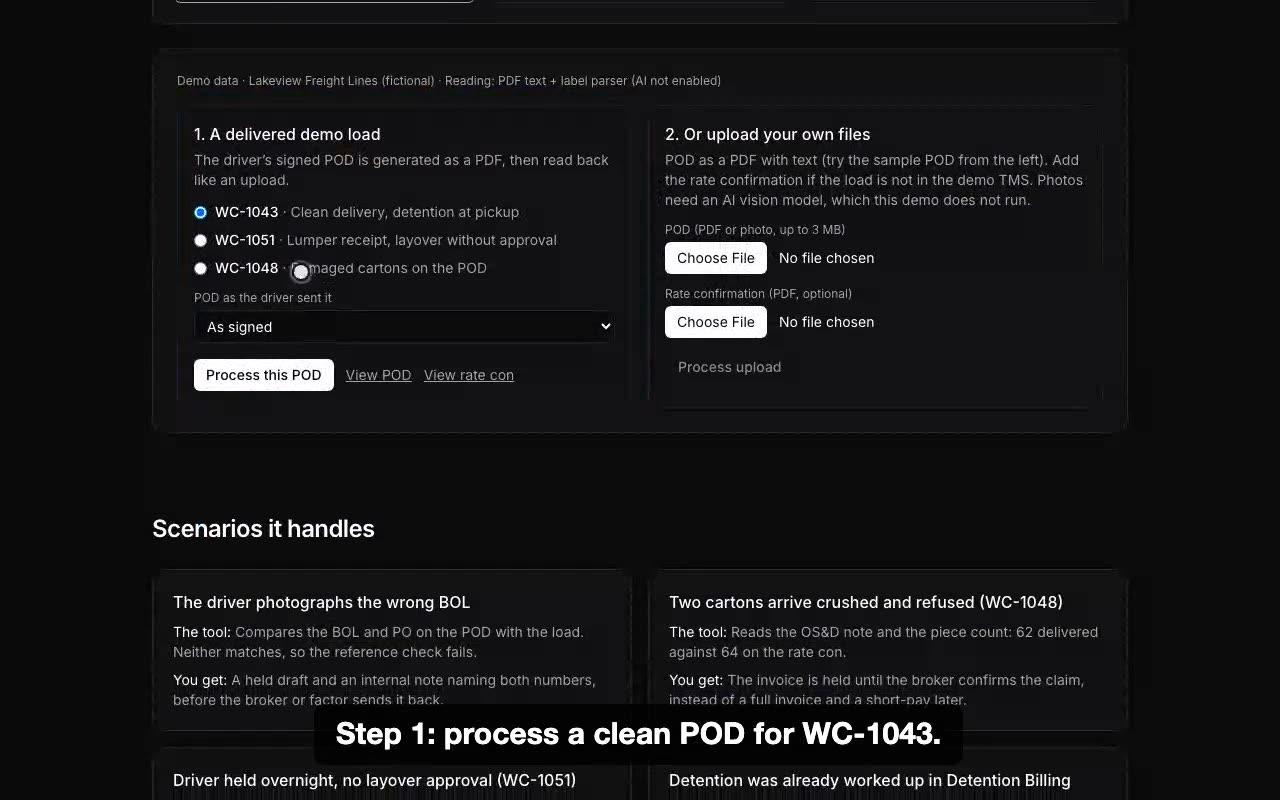
The driver photographs the wrong BOL
Compares the BOL and PO on the POD with the load. Neither matches, so the reference check fails.
Result: A held draft and an internal note naming both numbers, before the broker or factor sends it back.
Two cartons arrive crushed and refused (WC-1048)
Reads the OS&D note and the piece count: 62 delivered against 64 on the rate con.
Result: The invoice is held until the broker confirms the claim, instead of a full invoice and a short-pay later.
Driver held overnight, no layover approval (WC-1051)
Checks each accessorial for proof. The lumper receipt is there, the broker approval for layover is not.
Result: Lumper billed with its receipt attached; the layover is listed as not billed, with the reason.
Detention was already worked up in Detention Billing
Pulls the detention amount and the ELD evidence sheet into the invoice for WC-1043.
Result: One factoring packet: invoice, rate con, signed POD and the detention evidence.
A POD comes in that matches no load
Tries BOL, PO and load number. With no match it stops and asks for the rate confirmation.
Result: Nothing is invoiced on a guess. Upload your own POD and rate con PDFs to try it.
Today vs. with the tool
What changes for your team.
| Task | Today | With POD to Invoice |
|---|---|---|
| Getting the POD | The driver sends a photo when he remembers, or brings paper in at the end of the week. | The POD is read as soon as it arrives and matched to the load by BOL, PO or load number. |
| Checking the paperwork | The biller compares the POD and the rate con by eye, when there is time. | Six checks run on every POD, plus one per accessorial, each marked pass, warn or fail with the reason. |
| Accessorials | Detention and lumper are forgotten, or billed without proof and refused. | Added only with evidence; anything without proof is listed as not billed. |
| Invoice and factoring packet | Typed into the TMS or accounting, then PDFs gathered and merged by hand. | Invoice and merged packet are drafted; the biller reviews and sends, or releases a hold. |
Try the demo
Try it yourself in three steps.
On Lakeview Freight Lines, demo data.
- Step 1
Process a clean POD
WC-1043 is selected with 'As signed'; click 'Process this POD'.
- Step 2
Break the POD
In 'POD as the driver sent it', choose 'Driver forgot the signature' (or 'Wrong BOL on the POD') and click 'Process this POD' again.
- Step 3
See accessorials need proof
Pick WC-1051 (lumper receipt, layover without approval), set 'As signed' and click 'Process this POD'.
For a pilot
What we need from you.
To start
- ■Read-only access to your TMS for loads and rate confirmations
- ■Last month's PODs, as photos or PDFs the way drivers send them
- ■Your billing team agrees the checks and hold rules first, and who releases a held invoice
- ■Your factoring company or accounting system, and your invoice letterhead
- ■Start in parallel: we produce invoices, your team compares them with the ones they sent
Security and control
- ■We start read-only: loads and rate confirmations from your TMS, PODs as drivers already send them.
- ■During the pilot nothing goes to a broker or factor without your biller's approval. The demo drafts emails and never sends them.
- ■Every step is logged with a time, from POD received to invoice ready or on hold, as the demo's timeline shows.
- ■Your data is not used to train AI models. Where pilot data is stored (which region, your cloud account or ours) is agreed up front, under an NDA.
- ■We sign an NDA and a DPA before we see your loads, PODs or rates.
FAQ
Questions about POD to Invoice
Does it replace my biller?
No. It does the matching, checking and PDF work. Your biller reviews the invoice, sends it and decides what happens to a held one.
What if it reads the POD wrong?
Every check shows what it read and why it passed or failed. A missing or unclear value fails or warns, and the invoice goes to a person instead of out the door.
Can it read photos from the cab?
In production a vision model reads photos and scans. This demo reads text PDFs only, so photos are refused with that explanation.
Which TMS and factoring company does it work with?
Through an API, an export or email, whichever your TMS and factor support. We agree that in the pilot.
First 30 days free on one workflow.
Then month to month. No long contract. Pricing on a 15-minute call.