Solutions / Billing and cash
Detention Billing
Detention billed from ELD evidence instead of being forgotten.
The problem
Drivers wait hours at docks; without timestamps and a notice to the broker, nobody pays for it.
What it does
What it does, in plain words.
- Arrival and departure from the ELD geofence
- Free time and rate from the rate confirmation
- Notice to the broker when free time runs out
- Detention invoice and evidence sheet
How it works
From your data to a result you approve.
It takes in
- ■ELD location pings around each shipper and receiver (Samsara, Motive and others, through their API)
- ■Driver app status events: checked in, at door, loaded or unloaded
- ■Appointment time and detention terms from the rate confirmation PDF that comes with each load
It does
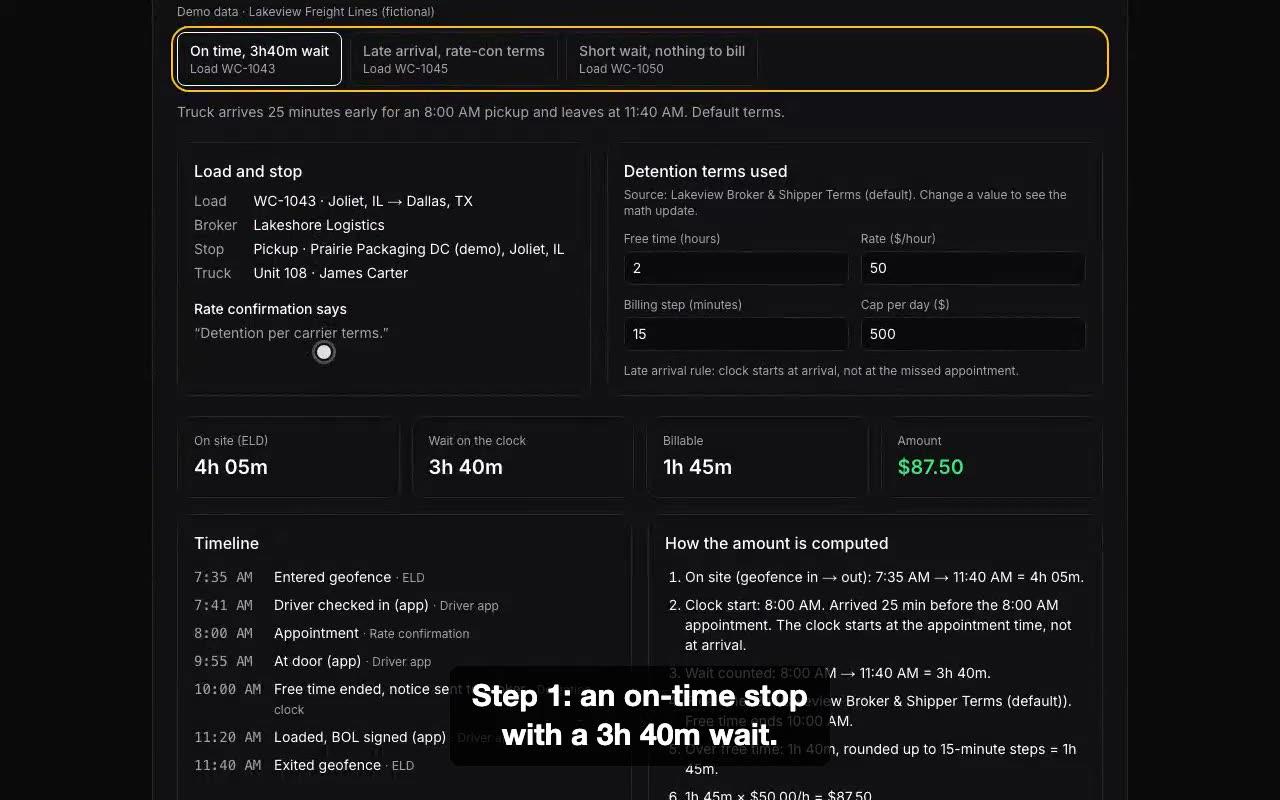
- 1.Arrival = first ELD ping inside the 0.5-mile facility geofence; departure = first ping outside after that
- 2.Early or on time: the clock starts at the appointment; late: at arrival, or no detention if the terms say so
- 3.Free time, rate, billing step and daily cap come from the rate con; carrier defaults only when it says nothing
- 4.Time over free time is rounded up to the billing step and capped per day
- 5.When free time runs out, a timestamped notice to the broker is drafted
- 6.If the stop is billable, an invoice, an ELD evidence sheet and an email draft are produced
- 7.The rules run in code, without AI; a person in billing sends what goes out
You get
- ■Broker notice at the moment free time ends
- ■Detention invoice PDF and ELD evidence sheet PDF
- ■Email draft to the broker's carrier payables contact
Real situations
What happens when…
The driver forgets to check in at the shipper
Takes arrival and departure from the first ELD ping inside and outside the 0.5-mile geofence. App events only add detail.
Result: Wait times that do not depend on anyone remembering to tap a button.
The rate con says nothing about detention
Falls back to your default terms (2h free, $50/h, 15-minute steps, $500/day) and names that source on the invoice.
Result: A claim on every load, with the terms it used written on it.
A long wait runs past the daily cap
Rounds the time over free time up to the billing step, then stops at the cap. Lower the cap in the demo to see it apply.
Result: An invoice line marked 'daily cap applied', never more than the terms allow.
The truck was late and the terms pay nothing for late arrivals
Checks arrival against the appointment and applies the rate con's late-arrival rule: clock from arrival, or no detention at all.
Result: No claim the broker will reject, and the reason written next to the zero.
The load has no appointment time
Starts the clock when the truck entered the geofence and says so in the step-by-step math.
Result: A clock start you can explain in one line if the broker asks.
Today vs. with the tool
What changes for your team.
| Task | Today | With Detention Billing |
|---|---|---|
| Knowing how long the truck waited | The driver calls or texts dispatch; times are written down later from memory. | Arrival and departure come from ELD pings, with the driver's app events alongside. |
| Telling the broker free time is over | Dispatch has to watch the clock while handling everything else, so the notice is often late or missing. | A timestamped notice is drafted the moment free time ends. Dispatch sends it. |
| Applying the rate con's terms | Billing digs out the rate con for free time, rate, step and cap, load by load. | The terms on that load drive the math, shown step by step. Billing checks it. |
| Backing up the claim | A dispute ends with 'your driver was late' and no timestamps to answer it. | An invoice, an ELD evidence sheet with every ping, and an email draft. Billing approves and sends. |
Try the demo
Try it yourself in three steps.
On Lakeview Freight Lines, demo data.
- Step 1
Read the on-time stop
'On time, 3h40m wait' (load WC-1043) is already selected; read the four tiles and 'How the amount is computed'.
- Step 2
Try a late arrival
Click 'Late arrival, rate-con terms', then change 'Rate ($/hour)' in 'Detention terms used' and watch the Amount tile.
- Step 3
Download the proof
Under 'Documents', click 'Detention invoice (PDF)' and 'ELD evidence sheet (PDF)', then open 'ELD pings' at the bottom.
For a pilot
What we need from you.
To start
- ■Read-only API access to one ELD, plus the facility geofences you already use
- ■Rate confirmations from a recent month, so we can read the detention terms
- ■Your default terms for when the rate con says nothing, and who approves changes to them
- ■Someone in billing compares our numbers with what you actually billed, before anything goes out
- ■Notices and invoices then go through your own email and your factoring or accounting system
Security and control
- ■In a pilot we start with read-only API access to one ELD and the rate cons you already have. Nothing in your ELD or TMS is changed.
- ■No notice, invoice or email goes to a broker without a person in billing approving it. In the demo they are drafted, never sent.
- ■Every geofence ping and driver event behind a number is kept and shown, with its source (ELD, driver app or rate con).
- ■The detention rules run in code, without AI, so the same stop always gives the same amount.
- ■Your data is not used to train AI models. Where pilot data is stored (which region, your cloud account or ours) is agreed up front, under an NDA.
FAQ
Questions about Detention Billing
Does it replace my biller?
No. It does the clock-watching and the arithmetic. Your biller decides what to send and to whom.
What if the times are wrong?
Every step of the math is shown, with the pings behind it. If the geofence or a ping looks off, a person fixes it before anything goes out.
Which ELDs and systems does it work with?
Samsara, Motive and others through their API. Rate cons come in as the PDFs you already get; invoices go out through your own email and factoring or accounting system.
Will brokers actually pay?
That depends on the broker. What the tool changes is that the notice goes out on time and the claim arrives with timestamps.
First 30 days free on one workflow.
Then month to month. No long contract. Pricing on a 15-minute call.