Solutions / Compliance and fleet
Maintenance & DVIR
Defects classified, trucks held until repaired, PM on time.
The problem
Defects reported on a DVIR get lost; trucks break down on the road with a load on.
What it does
What it does, in plain words.
- Classifies each defect: out of service, repair soon or cosmetic
- Keeps out-of-service trucks and lapsed inspections off new loads
- PM schedule by miles and days, work orders, loads at risk
- Drivers can report a defect by phone to the voice agent
How it works
From your data to a result you approve.
It takes in
- ■Pre-trip and post-trip DVIRs from the ELD inspection app or a web form
- ■Defects drivers report by phone to the TruckDesk AI voice agent
- ■ELD odometer for each truck; loads from the TMS
It does
- 1.Classifies each defect as out of service, repair soon or cosmetic, by a rule table written after the CVSA out-of-service criteria
- 2.A driver who says the truck is not safe to drive is always believed
- 3.Opens a work order for every defect: open → waiting on parts → done
- 4.Out-of-service defects or a lapsed annual inspection turn the truck red and keep it off new loads
- 5.Shows the load at risk on a held truck, with what to tell the broker
- 6.Tracks PM-A every 15,000 mi and PM-B every 45,000 mi from ELD miles, plus the annual inspection
- 7.Only a mechanic's sign-off clears a truck; the agent never does
You get
- ■Fleet board: out of service, needs attention, ready
- ■Work orders with status, estimate or cost and downtime
- ■Out-of-service hold that TruckDesk AI respects when it offers loads
- ■PM due list in miles and days
Real situations
What happens when…
A driver calls at night: “air leak on the trailer, I can hear it”
TruckDesk AI verifies the driver, writes the call up as a DVIR, classifies it with the same rules as the form and opens a work order.
Result: The driver is told not to drive, the truck is held, and dispatch sees the load at risk in the morning.
Steer tire at 3/32 versus 5/32 of tread
Reads the measured depth: under 4/32 on a steer tire is out of service, 5/32 is logged as repair soon.
Result: One truck held, the other keeps running with a work order for the next yard visit.
The driver is not sure what is wrong, but says the truck is not safe
Believes the driver (49 CFR 396.7) even when the description matches no rule, and holds the truck.
Result: The truck waits for a mechanic instead of being argued back onto the road.
Truck 108 has no open defects, but its annual inspection lapsed 6 days ago
Reads the inspection date from the compliance register and marks the truck not dispatchable (49 CFR 396.17).
Result: Truck 108 stays off new loads until the inspection is done, not just until defects are fixed.
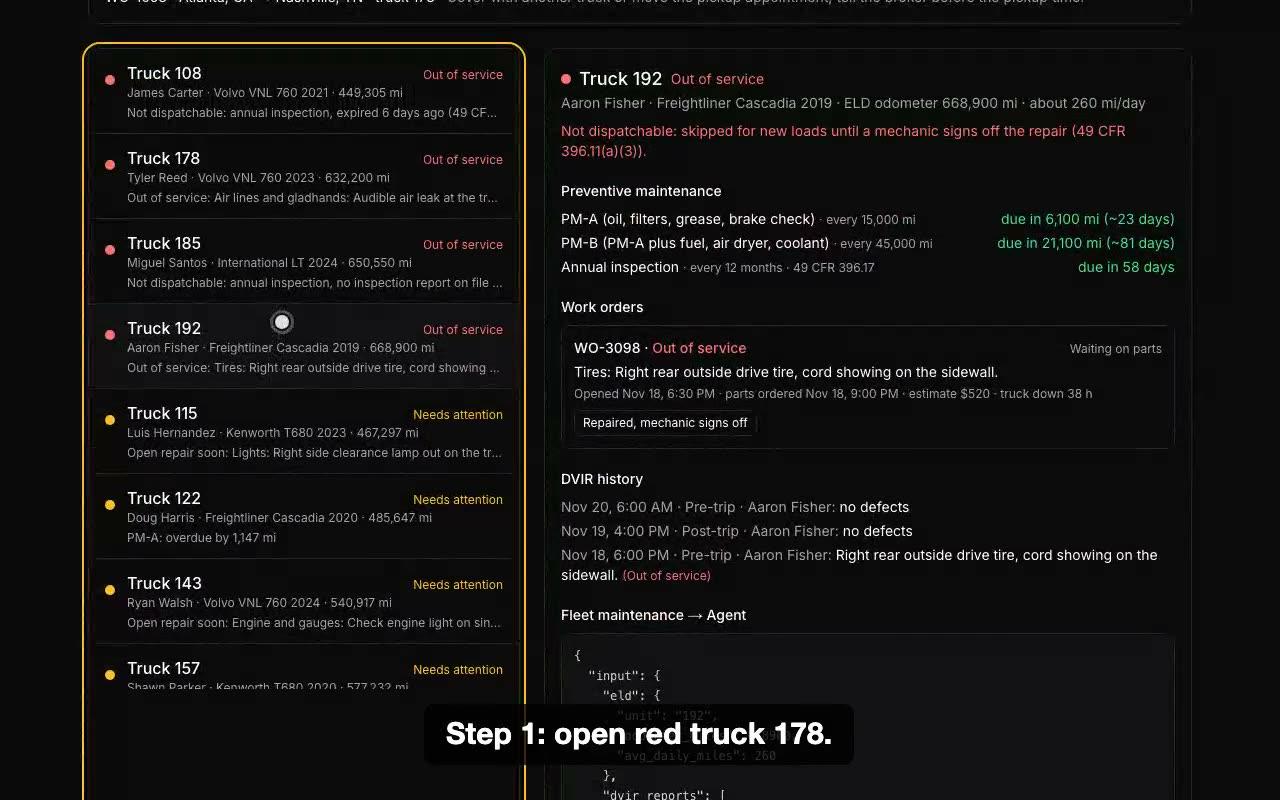
Truck 192 has cord showing on a drive tire and the part is on order
Keeps the work order in 'Waiting on parts' and the truck red; TruckDesk AI skips it when it offers loads.
Result: A held truck that cannot be booked by mistake while the shop waits.
Today vs. with the tool
What changes for your team.
| Task | Today | With Maintenance & DVIR |
|---|---|---|
| Seeing defects | DVIRs sit in the ELD app or a paper pad until someone in the shop looks. | Every defect is classified as it arrives and opens a work order. |
| Keeping unsafe trucks parked | Dispatch has to remember which truck is down, or hears about it from the driver. | Out-of-service trucks are held and skipped by load offers until the shop signs off. |
| Planning PM | A whiteboard and odometer readings typed in by hand. | PM due in miles and days from the ELD for every truck. The shop still books the work. |
| Covering the load | Found out when the pickup is missed. | The load at risk is shown next to the held truck; dispatch decides to cover or reschedule. |
Try the demo
Try it yourself in three steps.
On Lakeview Freight Lines, demo data.
- Step 1
Open red truck 178
In the fleet list, click 'Truck 178' (red, Out of service).
- Step 2
Move the work order to signed off
Under 'Work orders' for truck 178, click 'Parts ordered', then 'Repaired, mechanic signs off'.
- Step 3
Log a brake defect
In 'Report a defect', choose a green truck (e.g. 101), click the example 'Audible air leak at the right rear brake chamber', then 'Log defect'.
For a pilot
What we need from you.
To start
- ■Read-only access to your ELD's DVIR and odometer data (Motive, Samsara and others have APIs), or a recent export
- ■Your PM intervals, parts list and any rules stricter than the out-of-service criteria
- ■Where work orders live today (shop software or a sheet) and who signs off repairs
- ■Who in dispatch receives holds and loads at risk; the hold can go into your TMS
- ■Start by running a few weeks of past DVIRs through the rules and comparing with what your shop did
Security and control
- ■Read-only to start: the agent reads DVIRs and odometers from your ELD and loads from your TMS. It does not change them.
- ■The agent never clears a truck. Only a mechanic's sign-off releases a hold, and nothing goes to a broker about a load at risk without dispatch approving it.
- ■Every DVIR, classification, work order step and sign-off is logged with time and source (app, form or phone call). The demo console shows them.
- ■Drivers who report by phone are verified with their PIN first, as on TruckDesk AI.
- ■Your data is not used to train AI models. Where pilot data is stored (which region, your cloud account or ours) is agreed up front, under an NDA.
FAQ
Questions about Maintenance & DVIR
Does it replace my mechanic or shop lead?
No. It sorts defects and tracks work orders. The shop orders parts, repairs and signs off; dispatch decides about loads.
What if it classifies a defect wrong?
The rule and the reason are shown on every defect. When a safety part is described unclearly, it goes to the shop as repair soon rather than being dismissed, and a driver who says it is unsafe is always believed.
Is this the official out-of-service criteria?
No. The rules are written in plain words after the CVSA criteria for triage. The handbook has the exact measurements; your shop has the final say.
Which systems does it work with?
ELD inspection apps with an API (Motive, Samsara and others), shop software or a sheet for work orders, and your TMS, via API, export or email.
First 30 days free on one workflow.
Then month to month. No long contract. Pricing on a 15-minute call.