Solutions / Loads, brokers and shippers
Broker Check
Red flags on a broker before anyone says yes to the load.
The problem
Double brokering and identity theft cost carriers loads and unpaid invoices.
Uses live public data: FMCSA licensing, authority history, insurance and census files.
What it does
What it does, in plain words.
- Looks up the MC or USDOT in live FMCSA records
- Checks authority age and status, revocations, bond and insurance on file
- Spots an email domain or phone number that doesn't match the company
- Runs automatically on load offers taken by the voice agent
How it works
From your data to a result you approve.
It takes in
- ■An MC or DOT number
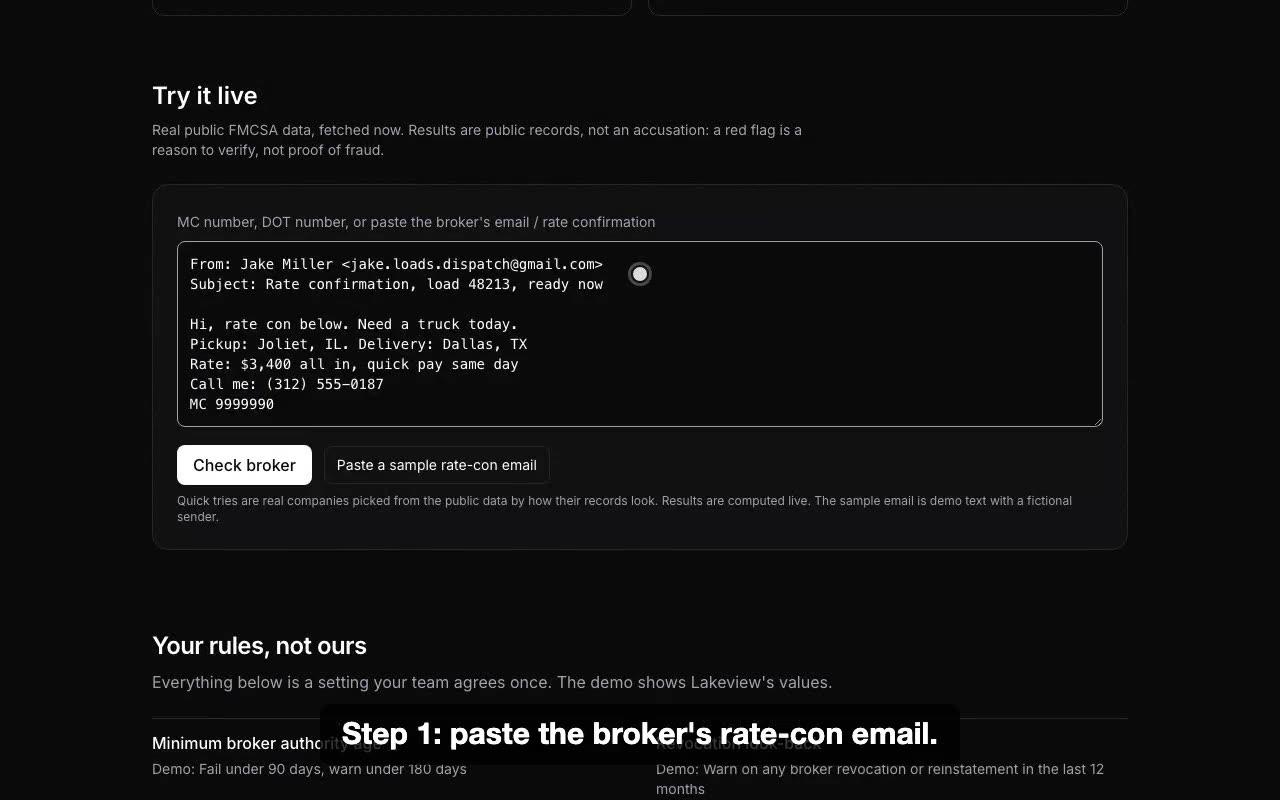
- ■Or the whole rate-confirmation email or broker message
- ■Public FMCSA datasets: licensing, authority history, insurance filings, company census
It does
- 1.Pulls MC, DOT, sender email and phone out of the text.
- 2.Fetches the company's public FMCSA records live.
- 3.Checks broker authority is active and how old it is.
- 4.Checks revocations in the last 12 months, pending revocation, broker bond and liability insurance.
- 5.Checks census freshness (MCS-150 update), company age and undeliverable mail.
- 6.Compares the sender's email domain and phone with what the company filed at FMCSA.
- 7.Gives a verdict (OK, Review, High risk) with the raw field behind each check.
You get
- ■A verdict with every check, its result and the raw FMCSA value
- ■The raw FMCSA rows and the query used, for anyone who wants to verify
Real situations
What happens when…
A broker you have never heard of offers a load
Looks up the number in the public FMCSA files. Try the quick try “Recently registered broker” (USDOT 6837167): the company was added to the census this month.
Result: High risk, with the census add date shown as the reason. You know to verify before anyone signs.
The email comes from a domain that is almost the broker's
Compares every email domain in the text with the email the company filed with FMCSA. Paste a rate con with a look-alike domain to see it.
Result: A warning that names both domains side by side, so a dispatcher spots the extra letter.
The MC is real, but it only holds carrier authority
Reads the broker status separately from the carrier status in the licensing file.
Result: A fail: brokering a load needs broker authority, and the check says that is what is missing.
The rate con quotes no MC or DOT at all
Finds no number to look up and does not guess.
Result: “Ask the broker for their MC number” instead of a false all-clear.
Someone gives a number that FMCSA does not know
Tries it as an MC, then as a USDOT number, before giving up.
Result: “No FMCSA record found. Do not book until the broker gives a number you can verify.”
Today vs. with the tool
What changes for your team.
| Task | Today | With Broker Check |
|---|---|---|
| Checking a new broker | Someone opens several FMCSA pages, if there is time, often after the load is already booked. | Every MC or rate con is checked in seconds, with the raw field behind each result. |
| Spotting identity theft | Depends on a dispatcher noticing a Gmail address or an unfamiliar phone number. | Email domain and phone are compared with what the company filed. A person calls the number on file. |
| Night and weekend bookings | Whoever is on shift decides alone, usually without a check. | The same check runs on every rate con and inside the voice agent while the broker is on the line. |
| Saying yes to a flagged broker | No record of who checked what. | The dispatcher still decides. The result, its sources and the time of the check are kept with the load. |
Try the demo
Try it yourself in three steps.
On Lakeview Freight Lines, demo data.
- Step 1
Check an established broker
Click the quick try “Long-established broker” (MC 561135).
- Step 2
Check a rate-con email
Click “Paste a sample rate-con email”, then “Check broker”.
- Step 3
Check a revoked authority
Click “Inactive broker authority” (MC 1131266), then open “Public FMCSA data → Agent” under the result.
For a pilot
What we need from you.
To start
- ■Access to the inbox where rate confirmations arrive, so each one is checked before anyone signs
- ■Your own rules: blocked list, minimum authority age, your factoring company's do-not-haul list
- ■Who gets the warnings and who can approve a flagged broker
- ■Can also run inside the TruckDesk AI voice agent while the broker is still on the line
Security and control
- ■It uses only public FMCSA data from data.transportation.gov. No login to your load boards or factoring account is needed.
- ■It only reads. It never contacts a broker, rejects a load or tells anyone they are flagged; a person decides what to do.
- ■Every result lists the dataset, the exact query and when FMCSA last updated it, so anyone can check it again.
- ■Your data is not used to train AI models. Where pilot data is stored (which region, your cloud account or ours) is agreed up front, under an NDA.
- ■We sign an NDA and a DPA before we touch your inbox.
FAQ
Questions about Broker Check
Does a red flag mean the broker is a fraud?
No. It is a reason to verify, usually by calling the phone FMCSA has on file. Plenty of honest brokers are new or use Gmail.
What if the FMCSA data is wrong or out of date?
Then the check is too, and it shows you the raw field and the update date so you can see that. It never hides what it read.
Does it replace our carrier-vetting service?
Not necessarily. It is a quick check at the moment of booking, and in a pilot it can also apply your own blocked or do-not-haul list.
Which systems does it work with?
Your rate-con inbox by email, your TMS by API or export, and the TruckDesk AI voice agent.
First 30 days free on one workflow.
Then month to month. No long contract. Pricing on a 15-minute call.